

An accounts manager was rushing between meetings when an email from their CEO appeared, marked “urgent”. It looked legitimate, with familiar branding, tone and a request to transfer funds to a new supplier account before close of business. Feeling the pressure, they authorised the payment without questioning it. Minutes later, the real CEO called. The email was fake. The organisation had lost thousands of dollars, trust was shaken and sensitive financial processes were exposed. That’s the danger of business email compromise: deception that exploits people, not technology.
As these attacks become more sophisticated, many organisations are looking at advanced business email compromise (ABEC) protection to fill the gap left by traditional email security controls. What many Mimecast customers don’t realise is that they may already have access to this capability, but it isn’t always configured or enforced correctly.
Business email compromise doesn’t look like the phishing attacks most people picture. There’s no malicious attachment, no dodgy link and no malware payload to catch. Instead, an attacker uses natural language and social engineering to persuade someone in your organisation to act, typically by impersonating a supplier or a senior executive.
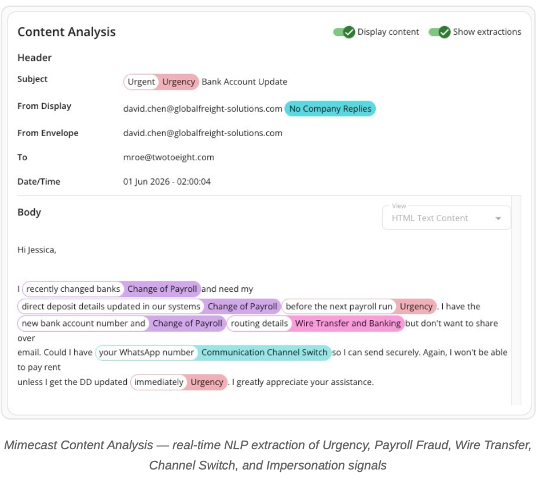
The requests follow familiar patterns once you know what to look for. They may include sudden changes to bank account details, an urgent payment request, asking to move the conversation to a personal channel like WhatsApp, or a seemingly reasonable request for gift cards. AI has made these messages harder to spot, as the clumsy, typo-filled scam email is largely a thing of the past. Instead, they’re now written to read as if they came from a real colleague in a tone and style tailored to the target.
Since there’s no file or link to scan, a gateway built purely around traditional threat detection can let these through. That’s the gap that ABEC protection exists to close, using intent analysis and behavioural signals rather than signature-based scanning. It looks at what a message asks someone to do, as well as what it carries.
Software evolves quickly, and vendors have become adept at regularly rolling out new features and capabilities. However, it’s easy for these to slip by unnoticed and unused when you have multiple systems and subscriptions running. We see this regularly among our clients, and sometimes it’s a deliberate choice to leave them unused, as new features might be incompatible with existing processes or require upgrades elsewhere before they can be used.
A long-standing Mimecast customer came close to switching providers because a newer entrant to the email security market ran a quick proof-of-value trial against their inbox and surfaced a list of threats their existing Mimecast gateway appeared to have missed. When our account team conducted a service and configuration review, the findings were straightforward. Mimecast had already detected every threat flagged by the competing platform’s trial, and nothing had slipped past the system.
The problem, however, was that the feature was set to monitor mode, which is the default configuration for many accounts due to the reasons we just mentioned. In monitor mode, threats get logged and reported, but nothing is blocked. Once the account team switched it to an enforcement setting and tuned it correctly, the picture changed immediately, with the customer describing it as “the competing dashboard went quiet.”
This is worth checking on your own account if you already have ABEC as part of your plan, and making sure it’s configured correctly rather than assuming it’s set by default. Monitor mode looks identical to enforcement mode on the surface, and the difference only shows up when it matters. You can speak to your Mimecast or Data#3 account executive to book a free Mimecast health check to ensure this and any other policies are in line with best practice.
If it isn’t part of your current plan yet, that usually comes down to timing more than anything else. Plans purchased or renewed a few years ago may predate advanced business email compromises being a standard inclusion. Either way, closing the gap doesn’t mean switching platforms, migrating data or learning a new interface. In most cases, it’s a conversation and a configuration review.
Mimecast’s position as a market leader in email security makes it a natural target. A handful of newer entrants have built their go-to-market strategy around directly challenging that position, and advanced business email compromise (ABEC) protection has become a key battleground. Several of these platforms can deploy a quick proof-of-value trial via an API-based approach that scans your recent mail history and produces a dashboard full of “missed” threats. It’s a fast and visual way to make an established gateway look outdated, regardless of what it’s capable of.
The fact is that many Mimecast customers who see these dashboards already have the protection being demonstrated to them and can be enabled. They’ve just never been told, or the platform is misconfigured with the ABEC feature in monitor-only mode.
Gateway, API and journal connectors are deployment methods, not protection stacks. Each deployment method has its own benefits and drawbacks, but none is inherently better than the other. While Mimecast supports both Gateway and API deployments, a gateway deployment is like having a highly trained security guard at the entrance to your building who inspects every visitor, package and delivery before they’re allowed in. An API-only deployment, on the other hand, is more like relying on CCTV cameras and security staff inside the building to identify suspicious people after they’ve already walked through the front door. Both have value, but stopping an attacker before they enter is far safer than chasing them once they’re roaming the halls. It all comes back to your organisation’s appetite for risk and what steps you’re willing to take to secure it.
Advanced business email compromise attacks continue to evolve, but responding to that risk doesn’t always require a new platform. Before investing in additional tools, organisations should ensure existing protections are configured, enforced and aligned to best practice. A review of current settings can often identify opportunities to improve protection while maximising the value of existing investments.
At Data#3, we always ensure you’re getting value from the investments you already have before considering new solutions. As a leading Mimecast partner for over 10 years, and with highest partnership tier, Data#3 has dedicated Mimecast Security Specialists who deliver tailored cyber security solutions, expert advice and ongoing optimisation to strengthen long-term resilience.
To check how your advanced business email compromise settings are configured, or to find out whether it’s part of your plan, a conversation with your Data#3 Mimecast specialist is the quickest way. Get in touch to arrange a review.
To check how your advanced business email compromise settings are configured, or to find out whether it’s part of your plan, a conversation with your Data#3 Mimecast specialist is the quickest way. Get in touch to arrange a review.
Information provided within this form will be handled in accordance with our privacy statement.